Planetary Dispersion
A downloadable tool for Windows and macOS
Planetary Dispersion
Planetary Dispersion is a standalone sound design application for exploring how sound might behave under different planetary atmospheric conditions.
It combines physically inspired atmospheric modelling with creative real-time audio processing. Compare 46 planetary and reference environments, adjust atmospheric conditions, process built-in sounds, use live microphone input, load your own WAV file, and record the processed output.
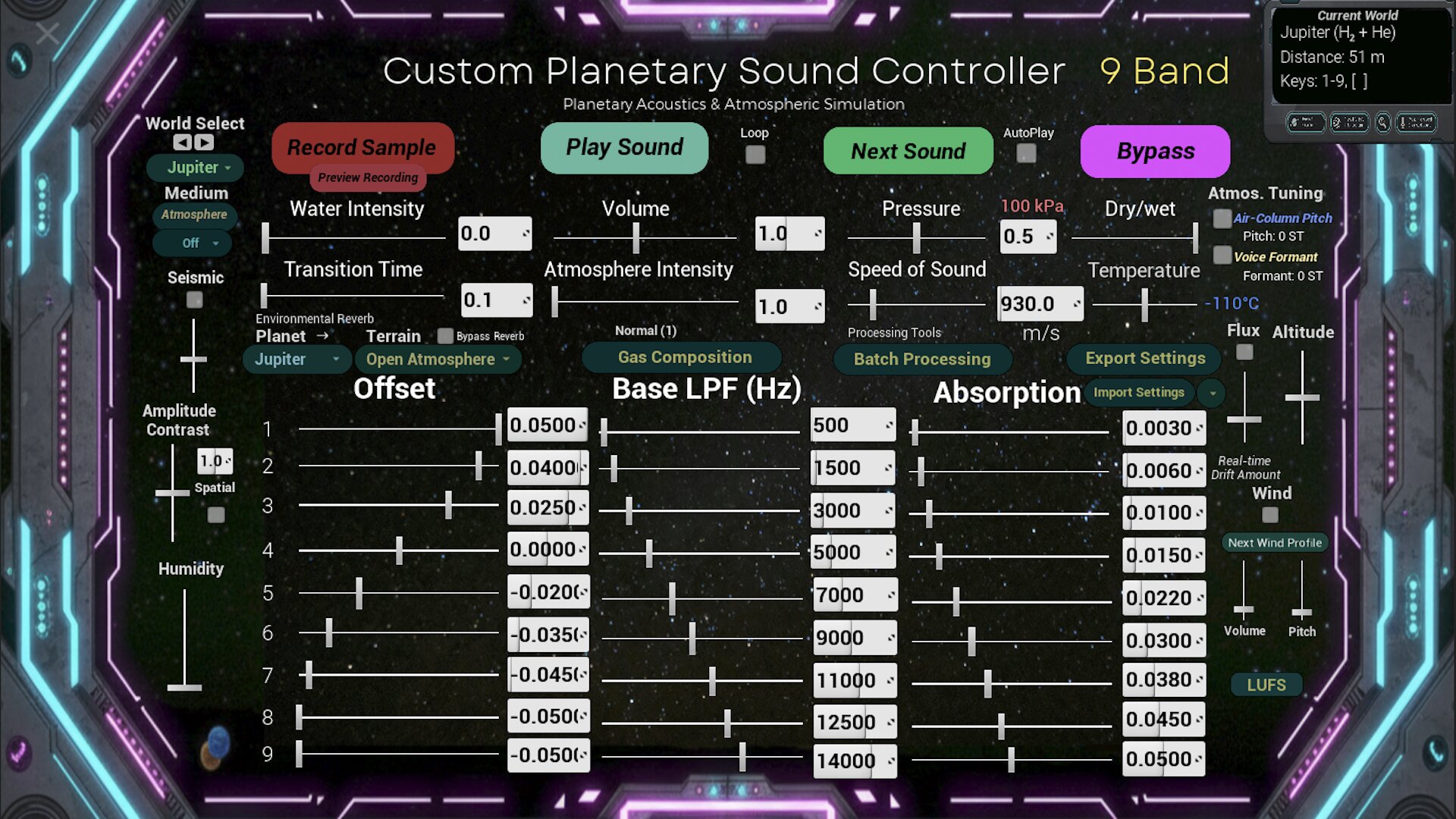
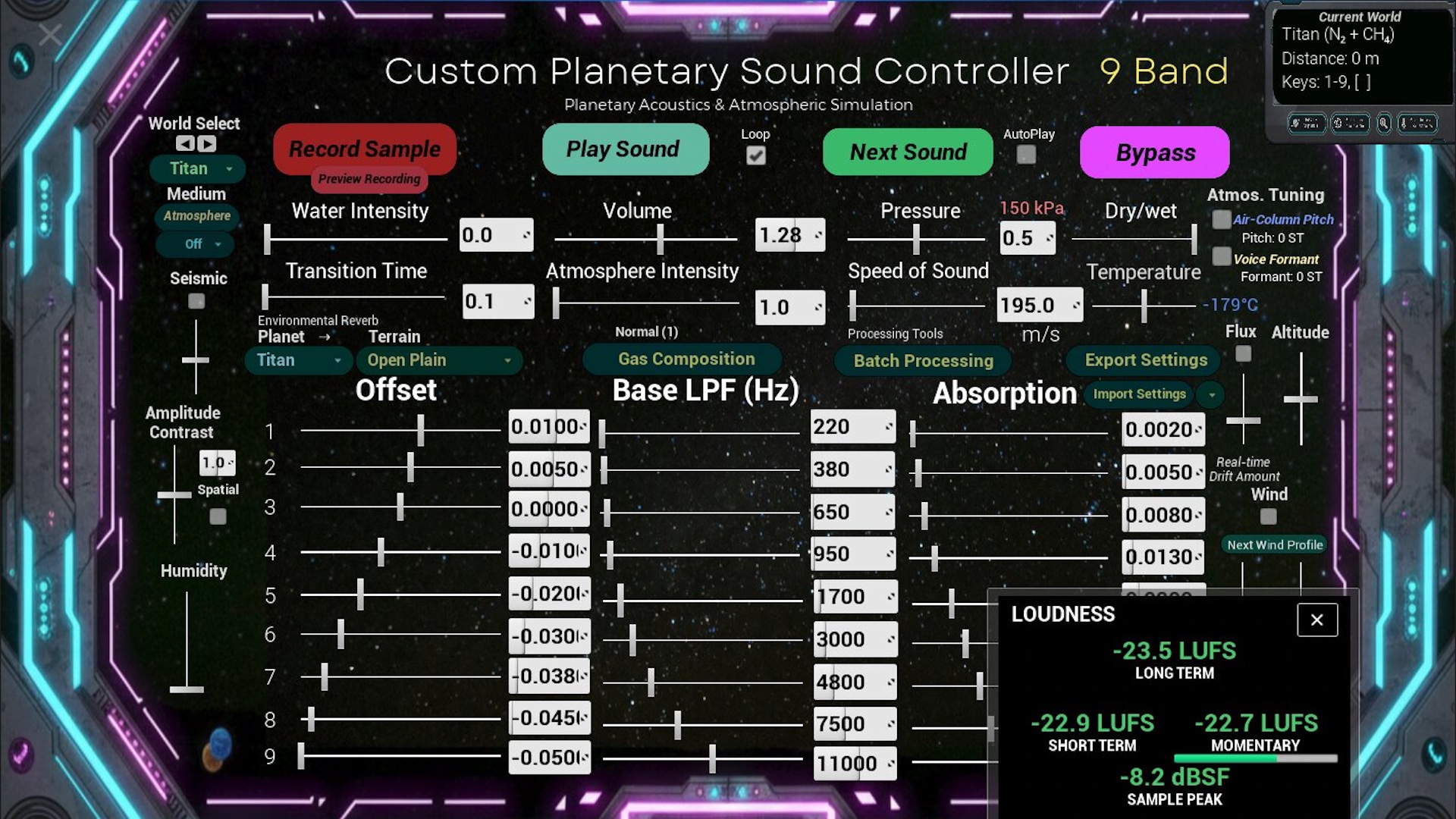
The system brings together speed of sound, pressure, temperature, atmospheric absorption, spectral filtering, temporal dispersion, wind, seismic activity, environmental reverberation, atmospheric tuning, and air and water propagation modes.
Planetary Dispersion is designed for sound artists, composers, educators, students, researchers, game-audio practitioners, and anyone interested in planetary acoustics and speculative sound environments.
This is a standalone application. Unreal Engine is not required, and Planetary Dispersion is not a DAW plug-in.
Project Links
Full demonstration and walkthrough: Watch on YouTube
Full project page, audio examples, and documentation: danielportelli.com.au/planetarydispersion
Complete Unreal Engine project: Planetary Dispersion on Fab
Microsoft Store: Windows build on the Microsoft Store
Features
Gas Composition Controller
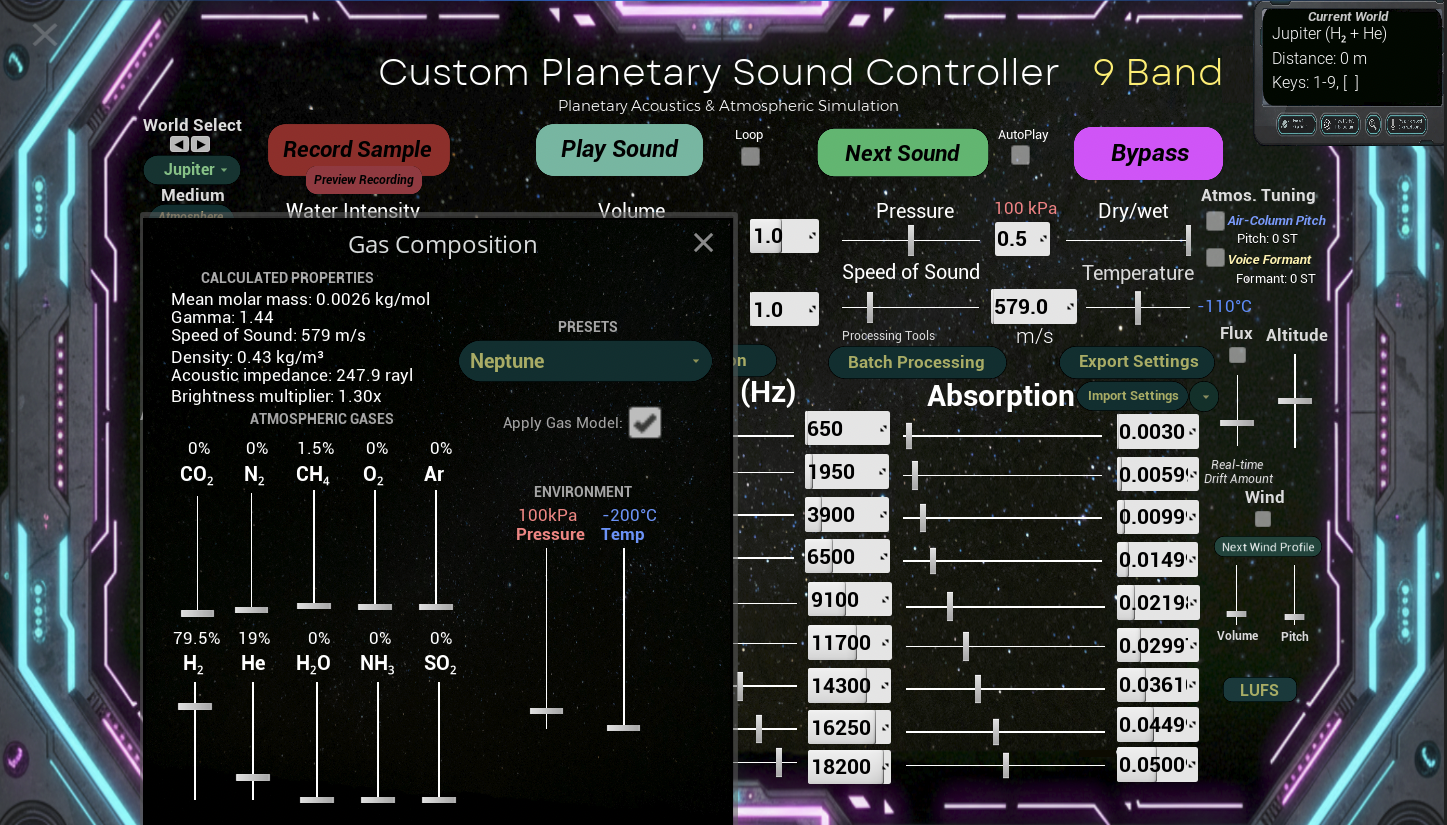
Create and modify atmospheric mixtures using ten gases: carbon dioxide, nitrogen, oxygen, argon, methane, hydrogen, helium, ammonia, sulfur dioxide, and water vapour.
The system estimates mean molar mass, heat-capacity ratio, speed of sound, density, and characteristic acoustic impedance using a simplified ideal-gas model. A gas-dependent brightness control also shapes the audio processing.
Nine-Band Atmospheric Processing
Atmospheric absorption, filtering, and temporal offset controls are distributed across nine frequency bands. This allows different parts of the spectrum to respond independently to the selected conditions.
Environmental Reverb and Terrain
Explore reverberation settings associated with open plains, craters, canyons, rocky basins, mountain ranges, ice fields, and ice caverns.
Atmospheric Tuning and Voice Colour
Apply speed-of-sound-based pitch changes to explore hypothetical tuning differences for voices and air-column instruments. An optional voice-colour effect shapes formant-like resonances.
These effects provide creative approximations of how a sound source might respond to a different atmosphere.
Auto Play
Generate evolving soundscapes by cycling through built-in sounds and changing planetary environments. Use Auto Play for comparative listening, demonstration, or creative exploration.
Batch Processing
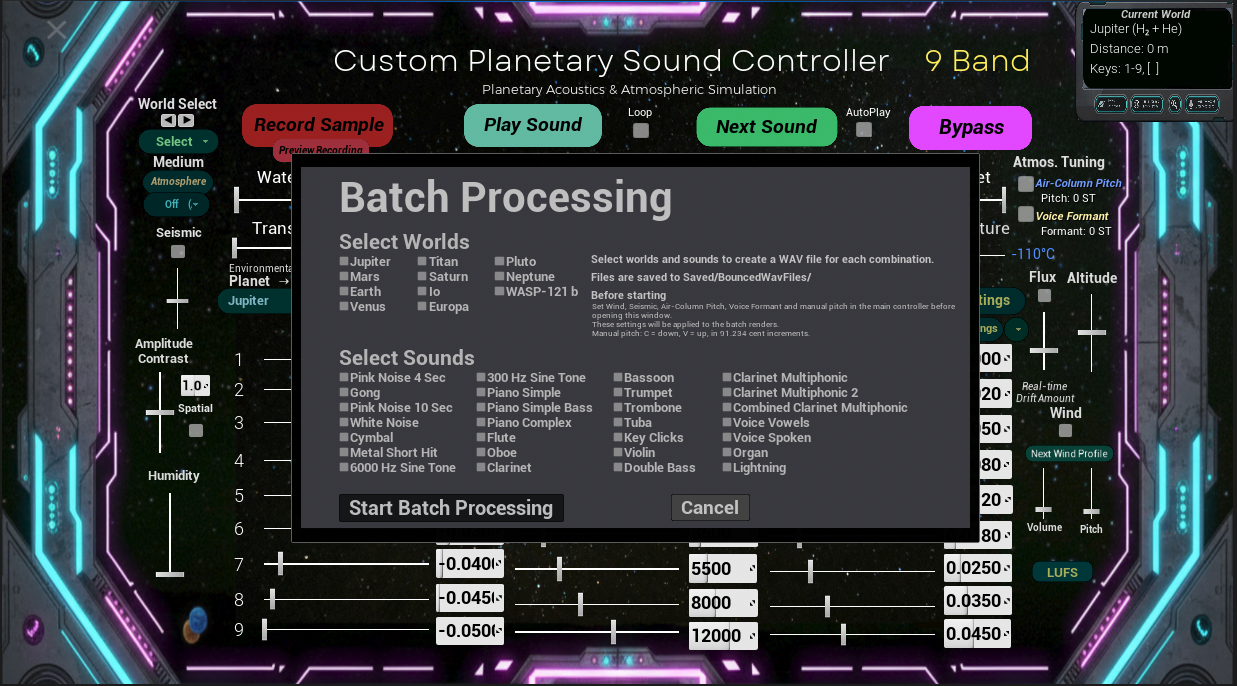
Process selected sounds across multiple planetary presets and create collections of rendered WAV files for comparison, teaching, research, or creative use.
Reporting and Settings
Export TXT, CSV, and JSON reports containing planetary, environmental, atmospheric, gas-composition, control, and nine-band processing values, with audio measurements where available.
Export settings as JSON and import them later to restore a configuration. Batch processing renders WAV files; reports are exported separately.
Planetary Presets
Planetary Dispersion includes 46 planetary, lunar, dwarf-planet, exoplanetary, speculative, and reference atmospheric environments.
The collection spans familiar Solar System worlds, hydrogen-rich atmospheres, steam-haze models, ocean-world scenarios, rock-vapour atmospheres, exospheres, plume environments, and pure-gas references.
Examples include:
- Earth Reference: A familiar terrestrial baseline for comparative listening.
- Mars: A thin carbon dioxide atmosphere with modelled changes in propagation speed and frequency-dependent attenuation.
- Venus: A hot, dense carbon dioxide atmosphere explored through pressure, temperature, propagation, and filtering controls.
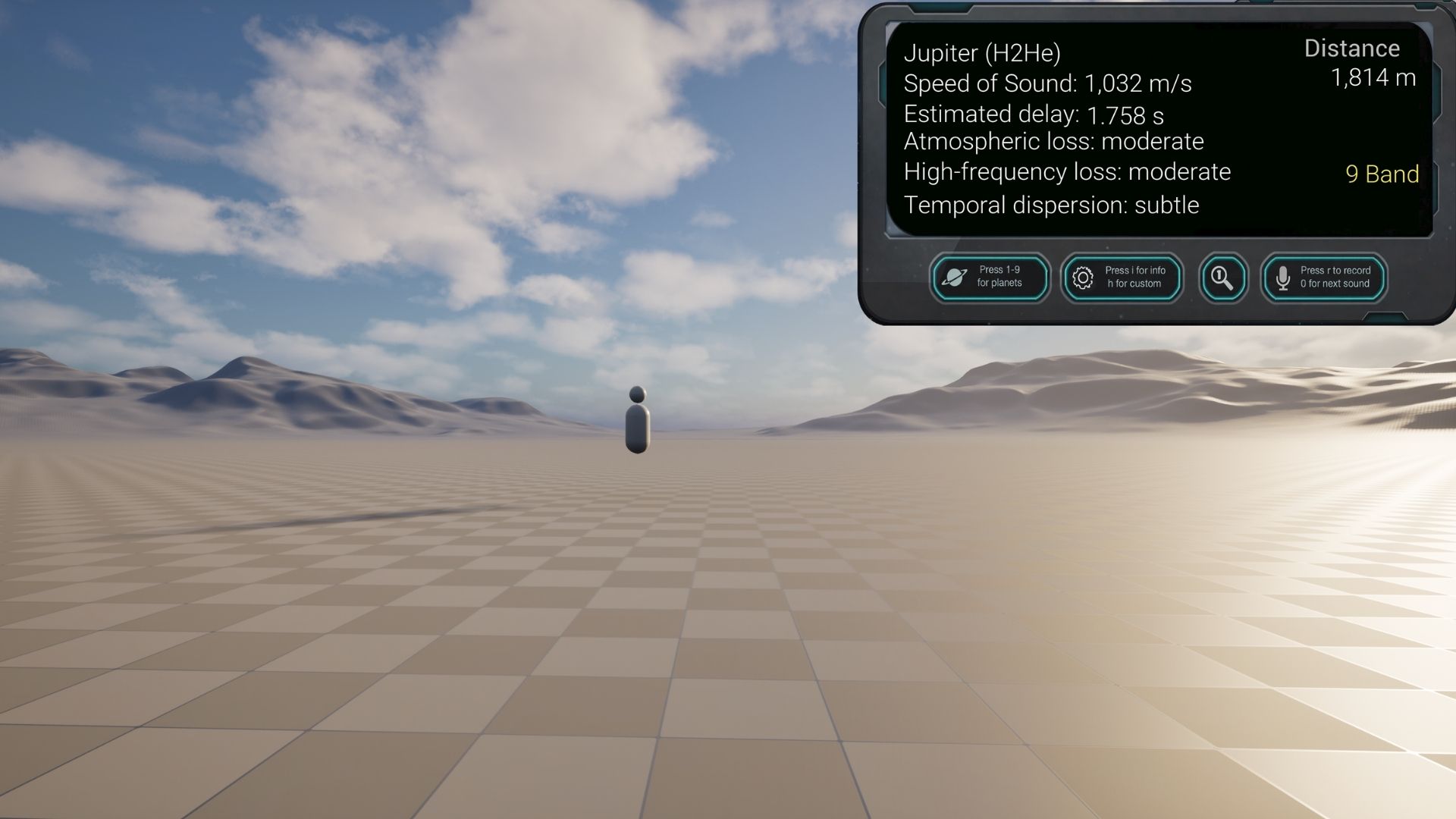
- Jupiter and Saturn: Hydrogen- and helium-rich atmospheric models with high sound speeds and optional air-column tuning effects.
- Titan: A cold, nitrogen-rich atmosphere containing methane, with a lower sound speed than the Earth reference.
- Moon (Exosphere Model): A speculative listening model associated with an extremely tenuous exosphere. It does not represent ordinary airborne sound transmission through a vacuum.
- Io and Europa: Models associated with extremely tenuous atmospheres, explored through the application’s creative acoustic processing.
- Neptune: A cold, hydrogen-rich atmospheric model with distinctive propagation and tuning settings.
- Pluto: A model informed by a cold, tenuous, nitrogen-dominated atmosphere.
- WASP-121 b: An extreme exoplanet atmosphere used to explore contrasting thermal and acoustic conditions.
- Pure CO₂, N₂, and CH₄ References: Controlled gas-composition presets for comparison.
The full project page includes the complete environment list and a downloadable 46-preset reference guide.
These are model-based listening environments. Some presets draw on measured atmospheric data; others explore published constraints or speculative scenarios. They are not recordings of the worlds themselves.
Audio Sources
Built-In Test Sounds
Explore pink noise, sine tones, percussion, piano, sustained strings, brass, woodwind instruments, clarinet multiphonics, key clicks, and other reference material.
Live Microphone Input
Use a built-in microphone, external microphone, or audio interface as a real-time sound source.
User WAV File
Place your own WAV file in the application’s UserAudio folder and process it through Planetary Dispersion. Instructions appear below.
Master WAV Recording
Record the final processed output as a WAV file. Capture built-in sounds, live input, user audio, preset changes, and real-time control movements.
Basic Controls
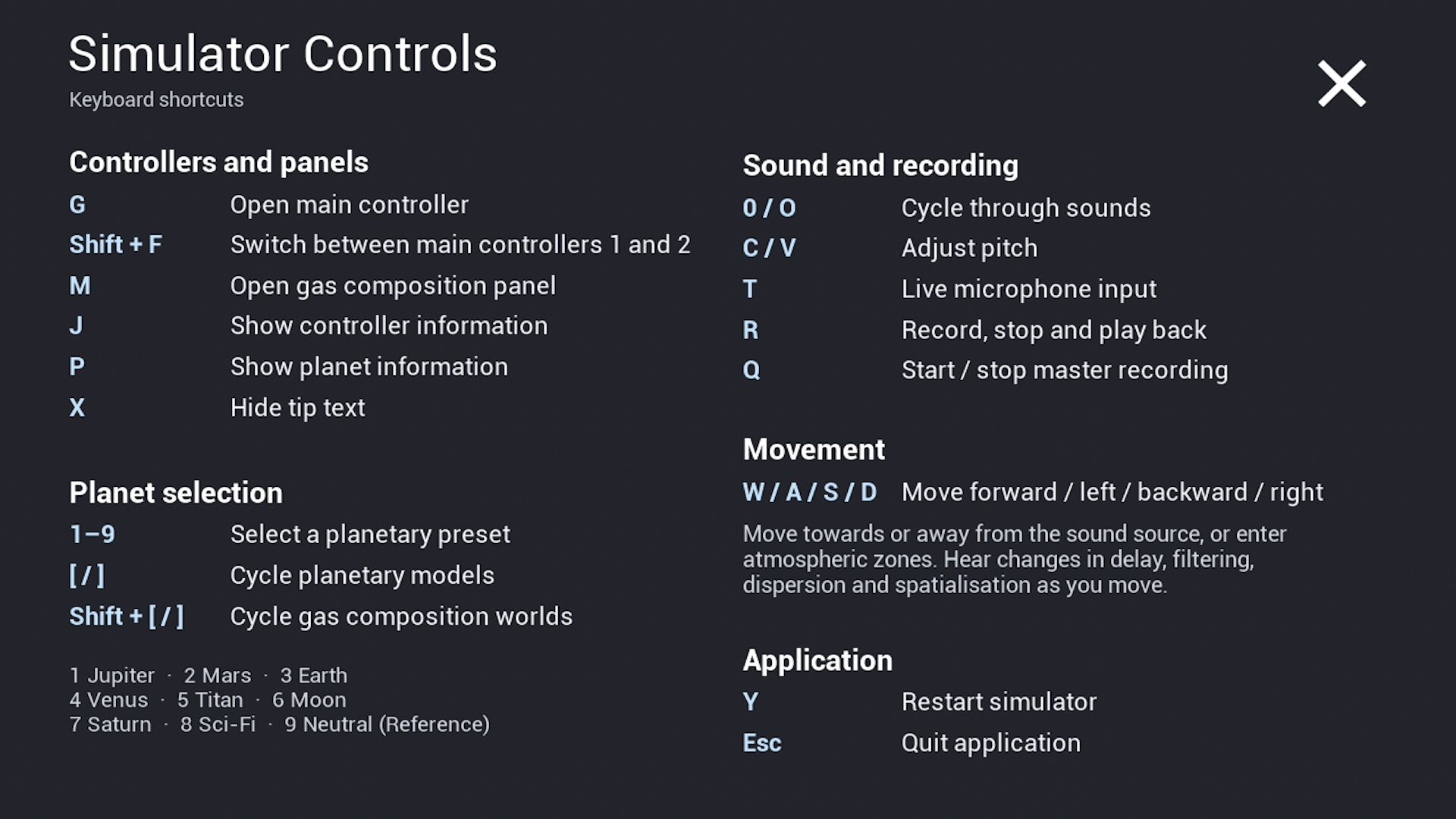
- 1–9 — Select the original numbered planetary presets
- [ — Previous world
- ] — Next world
- 0 or O — Cycle through built-in sounds
- T — Enable or disable live microphone input
- U — Play or pause UserSound.wav
- Q — Start or stop master WAV recording
- C — Decrease manual pitch
- V — Increase manual pitch
- P — Show or hide planetary information
- I — Show or hide the controls panel
- J — Show or hide additional project information
- X — Enable or disable tooltips
- Y — Reset the system
- Esc — Quit the application
Installation
Windows
- Download PlanetaryDispersionWin.zip.
- Extract the complete ZIP archive.
- Open the extracted folder.
- Run PlanetaryDispersion.exe.
Keep the EXE file with all accompanying folders and files. Moving it out of the extracted folder can prevent the application from running.
macOS
- Download PlanetaryDispersionMac.zip.
- Extract the ZIP archive.
- Open the Planetary Dispersion application.
If macOS blocks the application, review the message and the app’s entry under System Settings > Privacy & Security. Depending on your macOS version, you may need to use Open Anyway, or Control-click the app and select Open.
Unreal Engine is not required to run either standalone version.
Using Live Microphone Input
Press T to enable or disable live microphone input.
On macOS, you may need to allow microphone access under:
System Settings > Privacy & Security > Microphone
Make sure Planetary Dispersion is permitted to access the microphone.
Use headphones when monitoring a live microphone to avoid feedback from speakers.
Routing audio from another application may require a virtual audio device.
Loading Your Own WAV File
- Run Planetary Dispersion at least once.
- Locate the UserAudio folder inside the application’s Saved directory.
- Place a WAV file inside the folder.
- Name the file exactly UserSound.wav.
- Open Planetary Dispersion and press U to play or pause the file.
Use a standard PCM WAV file for reliable playback.
macOS UserAudio Folder
/Users/[your username]/Library/Containers/com.DanielPortelli.PlanetaryDispersion/Data/Library/Application Support/Epic/PlanetaryDispersion/Saved/UserAudio/
In Finder, press Command + Shift + G, paste the path, and replace [your username] with your macOS account name.
Windows UserAudio Folder
C:\Users\[your username]\AppData\Local\PlanetaryDispersion\Saved\UserAudio\
You can also press Windows key + R and enter:
%LOCALAPPDATA%\PlanetaryDispersion\Saved\UserAudio\
Place UserSound.wav in UserAudio. The BouncedWavFiles folder is used for master recordings.
Master Recording
- Select a built-in sound, live microphone input, or UserSound.wav.
- Select a world and adjust the sound parameters.
- Press Q to begin recording.
- Perform, listen, change presets, or adjust controls.
- Press Q again to stop and save the recording.
The WAV file is saved in the application’s Saved/BouncedWavFiles folder. The exact saved path is displayed on screen after recording stops.
Listening Recommendations
Best experienced with headphones or dedicated studio monitors.
Try the same sound across several environments to hear their differences. Sustained instruments and voices reveal changes in tuning, resonance, and spectral colour. Percussion, pink noise, and other broadband sounds help reveal filtering, absorption, and temporal behaviour.
Use bypass and dry/wet controls to compare the original sound with the processed output.
Teaching and Research Resources
The full project page includes:
- An introductory student activity
- A creative research brief
- A gas-composition formula guide
- A 46-preset reference guide
- An example configuration and audio-measurement report
- Demonstration videos, audio examples, and selected research sources
These resources support comparative listening, experimental composition, procedural audio teaching, and critical reflection on speculative acoustic models.
Model Scope
Planetary Dispersion is a creative acoustic modelling system informed by atmospheric and acoustic research. It simplifies physical processes to make environmental conditions playable and audible.
Control values and internal processing parameters are application settings rather than physical measurements. Calculated gas properties use a simplified ideal-gas approximation, and some planetary environments are speculative.
The application does not provide validated predictions of exactly what a listener would hear on another world.
Standalone and Unreal Engine Versions
The standalone version supports listening, teaching, demonstration, performance, recording, and sound-design experimentation.
The complete Unreal Engine project on Fab provides access to the Blueprint, MetaSound, interface, atmospheric, reporting, and procedural-audio systems for inspection and modification.
Licence and Usage
Planetary Dispersion is free to download and use for personal, educational, research, and creative purposes.
The application, interface, presets, documentation, included audio, and included media remain copyright © 2026 Daniel Portelli.
Redistribution, resale, repackaging, reverse engineering, or incorporation into another software product is not permitted without written permission.
Download
Click download now to get access to the following files:
Leave a comment
Log in with itch.io to leave a comment.